

Alerts from your work stack, in one place on your Mac
Alerts from your work stack reach your island with a sound, then wait on a page of their own: what fired, the rows or items behind it, its status and your notes. Work one yourself, or hand it to an AI agent.
Where alerts from your work stack come from
An alert is one time a monitor's rule became true. The monitor is what fires; the alert is what you handle.
Every alert starts with a monitor: one question asked of one tool, in its own language, every 15 minutes by default (from 30 seconds to 30 days). Each monitor has one rule:
- New rows or items appear: something matches that did not match at the previous check.
- The count crosses a threshold: greater than, at least, less than, at most, equal to or not equal to a number you choose.
When a check makes the rule true, CoIsland records one alert with what it saw. Whichever connector ran the check, the alert lands in the same island and the same list, titled in the monitor's own words:
| Connector | Monitor and its query | The alert it raises |
|---|---|---|
| Snowflake | Custom SQL: orders over $10,000 in sales.orders | 3 new rows in Big orders |
| GitHub | Issues and pull requests: repo:acme/api is:issue is:open label:bug | 2 new items in API bugs |
| Jira | SLAs: project = HELP AND "Time to resolution" = breached() | 1 new request in Breached SLAs |
| Snowflake | Failed tasks, with a count rule: count > 0 | Failed tasks: row count greater than 0 |
The first check of a new-rows monitor raises nothing: it records what already matches as its baseline. A count rule has no silent first check, so a table that already breaks it tells you at once. A check that fails shows as an error on the monitor, not as an alert.
How an alert reaches your island
Work notifications in an island on your Mac: a short peek, one sound, and a card you can act on.
When a monitor fires, the island opens for five seconds on its card and plays its sound: Glass unless you pick another of your Mac's sounds, or none. Monitors that fire together open the island once, with one sound. With the island hidden, the sound still plays.
- The ring shows +N and pulses yellow, and the card lists the new rows or items first.
- A click on the ring opens the monitor's newest new alert.
- Press and hold the ring to mark its rows seen: its new alerts become acknowledged.
- The card ends with Claude Code, Codex and Cortex Code, to start one on the newest new alert.
Your first four monitors stay in the island; later ones join it only when they alert. Each row of Monitors changes that. The home page shows the cards.
The alert page: everything that fired it
A click on an island card, or on a row of the list, opens it.
Three facts lead the page: Expected, what the monitor was waiting for ("No new matching rows"); Observed, what it saw ("1 new row, 5 matching at that check"); and Detected, when.

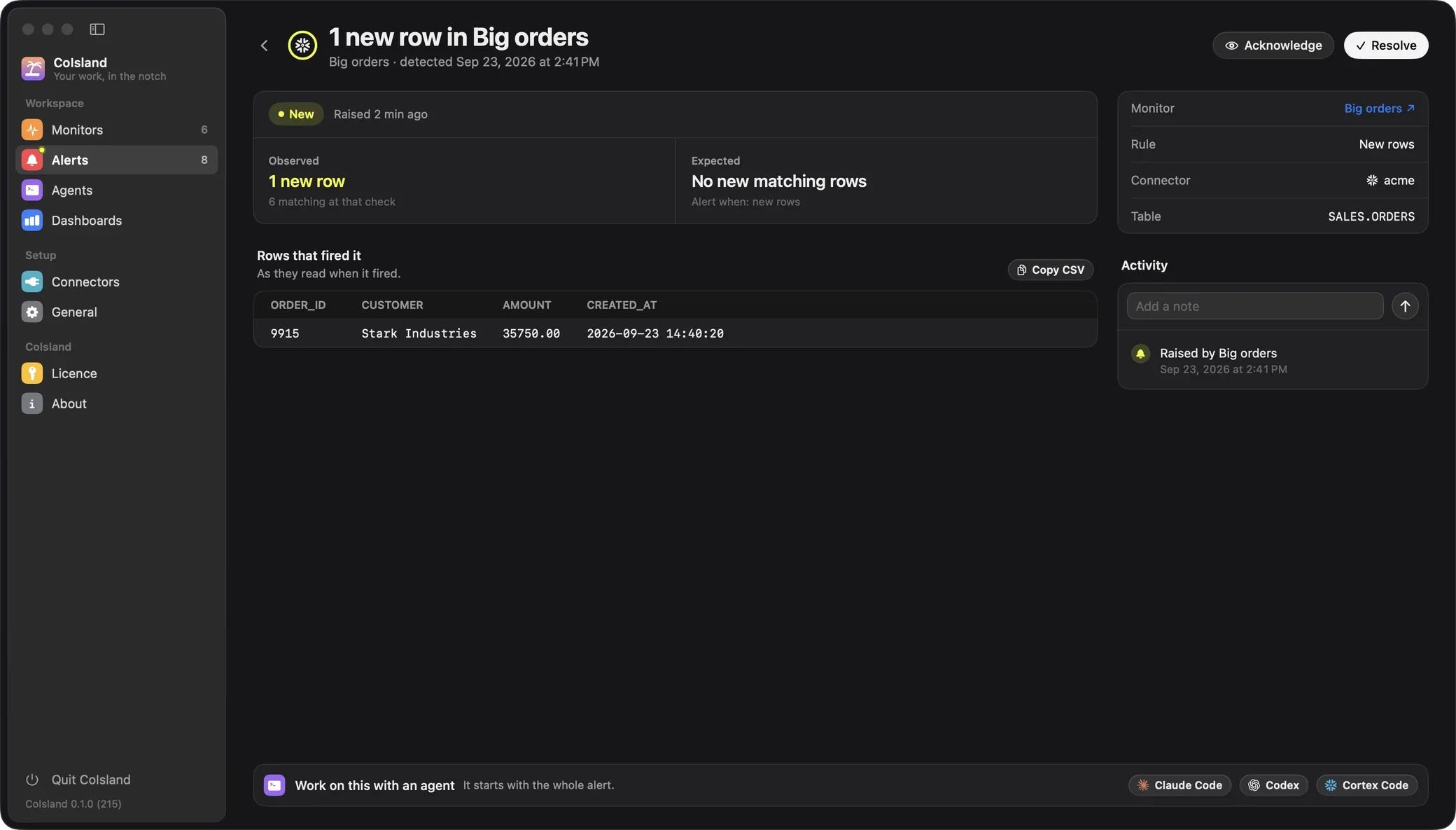
- The rows that fired it, as they read when it fired, up to 200. Copy CSV puts them on your clipboard.
- The items, for GitHub and Jira: each issue, pull request or comment as a card, then as the tool has it now, with Open on GitHub or Open in Jira.
- Details: the monitor, linked, its status, rule, connector and, for SQL, tables.
- Activity: when it was raised, every status change, and your notes, each dated.
Delete the monitor and its alerts stay, marked deleted.
Acknowledge and resolve alerts
Three statuses, and you decide when an alert moves.
-
New, in yellow: the monitor fired and nobody has looked yet.
-
Acknowledged, in blue: someone is on it. The monitor's +N drops by its rows.
-
Resolved, in green: dealt with, and kept. Reopen it and it is new again.
Acknowledge, Resolve and Reopen sit at the top of the alert page and in the list's right-click menu. Nothing changes status on its own: CoIsland never resolves an alert because its rows left the result. Three shortcuts acknowledge in bulk; none resolves:
| Where | What it does |
|---|---|
| Mark as seen, on a monitor's page | That monitor's new alerts become acknowledged, and its ring stops counting. |
| Press and hold a ring, in the island | The same, without opening Settings. |
| Acknowledge All, in the menu bar menu and in General › Checks | Every monitor's new alerts become acknowledged. |
Each change is dated in the activity, so the dashboards know how long alerts wait.
Alert triage in one list
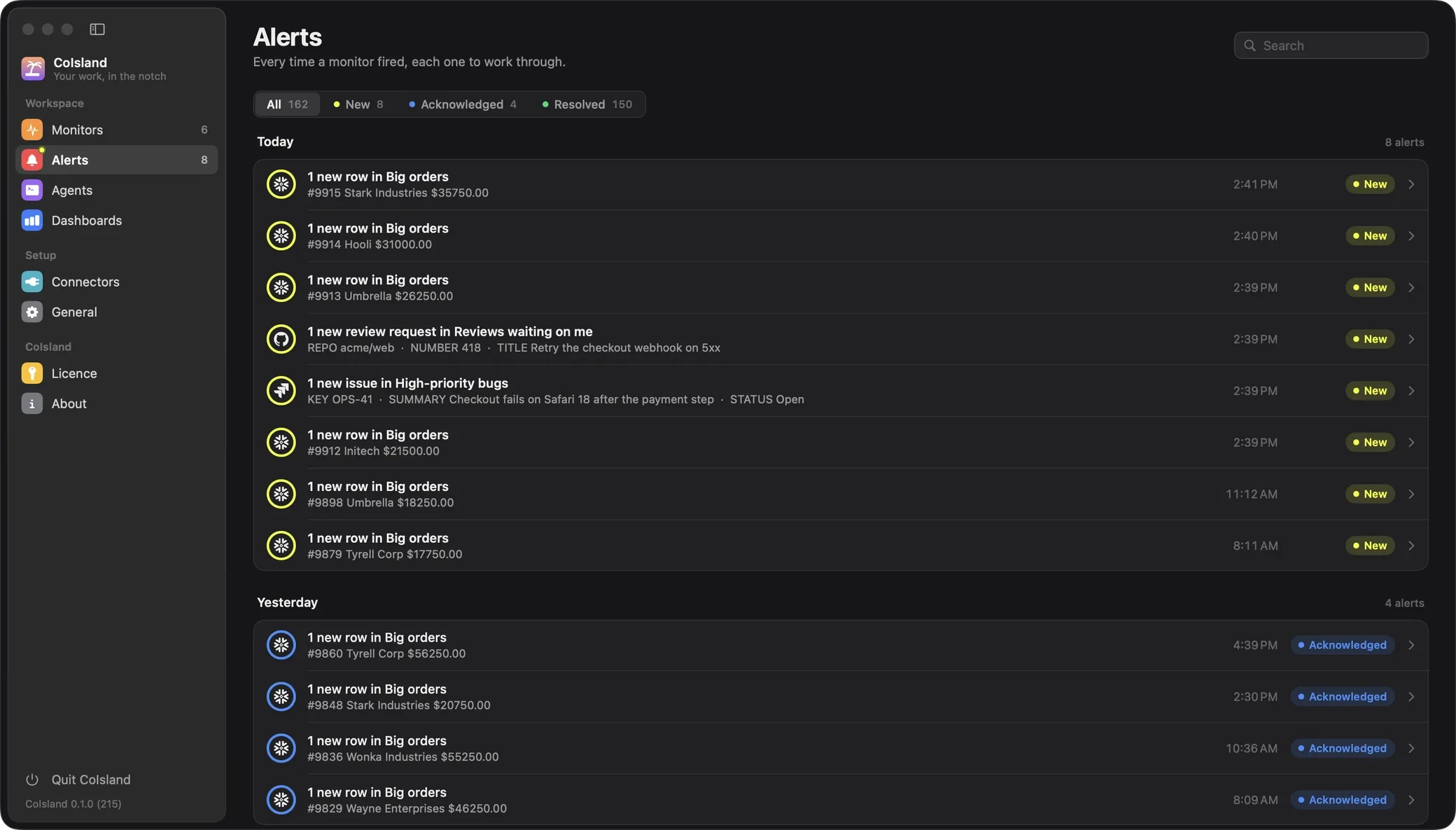
Settings › Alerts: newest first, a group per day, the way Mail lists what arrived.
Every alert, whatever its connector, lands in Settings › Alerts. A row shows the monitor's ring in the status color, the title, the first row or item that fired it and the time.
- Filters: All, New, Acknowledged and Resolved, each with its count.
- Search: titles, monitor names and the rows or items that fired them.
- The sidebar counts new alerts, with a yellow dot.

CoIsland keeps the 500 newest alerts in one file on your Mac, ~/Library/Application Support/CoIsland/alerts.json, that only your user account can read. There is
no CoIsland server to send them to.
When a monitor keeps firing
How CoIsland keeps alert fatigue down, and the settings that help.
A new-rows monitor raises one alert per check that finds something new: ten failed runs in one check are one alert with ten rows. A row that stays in the result never alerts twice. A count rule fires once when it starts matching, and again only after it has cleared.
This Snowflake watch file alerts on each failed task run once, keyed by task and scheduled time:
-- name: Failed tasks
-- database: ANALYTICS
-- every: 5m
-- key: NAME, SCHEDULED_TIME
-- alert: new-rows
-- sound: Basso
SELECT name, scheduled_time, error_message
FROM TABLE(INFORMATION_SCHEMA.TASK_HISTORY(
  SCHEDULED_TIME_RANGE_START => DATEADD('hour', -1, CURRENT_TIMESTAMP())))
WHERE state = 'FAILED'
With -- alert: count > 0 instead, it alerts once when failures appear, then stays quiet until a
check finds none in the last hour. To hear less, give a SQL monitor a key (without one, a row whose columns
change reads as new), narrow its query, or set its sound to none.
On the Dashboards, Actionability is the share of alerts someone acknowledged or resolved: a falling share is alert fatigue. Noisiest monitors names the ones raising the most.
Work on this with an agent
Claude Code, Codex or Cortex Code, in a terminal under the alert.
At the foot of every alert page, Work on this with an agent offers Claude Code, Codex and Cortex Code. A click starts that agent's own CLI, with your account, in a terminal under the alert.
Its first message is the whole alert: the facts, the monitor's query, every row and item kept, and the activity with your notes. It asks the agent to find the cause, fix what is safe and can be undone, and ask you before anything destructive. Claude Code and Codex start in their auto modes, Cortex Code in its default Confirm mode. The agent adds notes to the alert but never acknowledges or resolves it: you do.
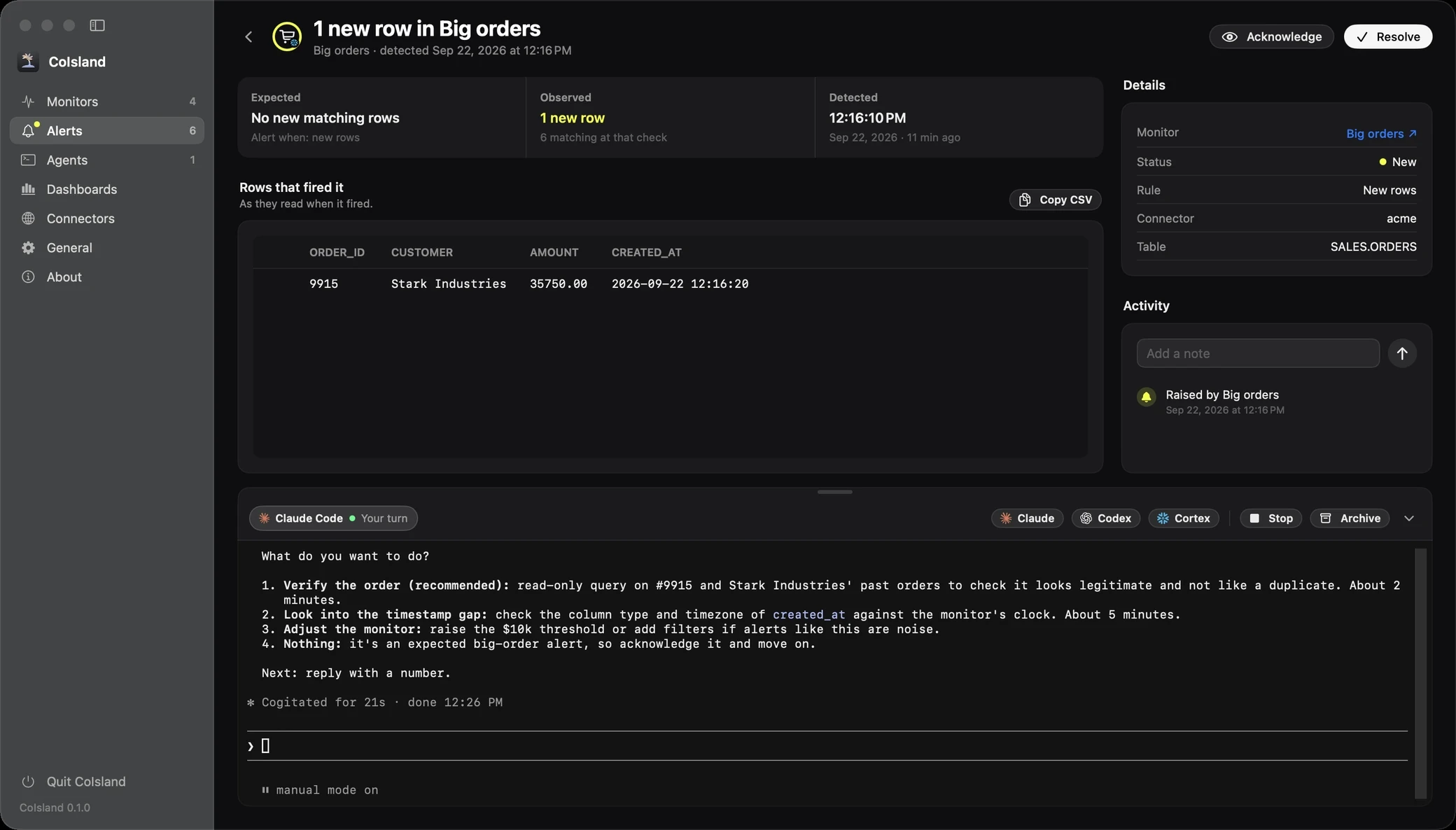
Each session is a tab along the bar and a row in Settings › Agents, to resume, stop or archive. See Agents, then the agents docs to set them up, or start with Getting started.
Questions about alerts
Can I see alerts from all my work tools in one place on my Mac?
Yes. Every monitor raises its alerts into the same island and the same Alerts list, whichever connector runs it, on any of the 39 tools CoIsland connects to today.
What is the difference between acknowledging and resolving an alert?
Acknowledged means someone is on it: the alert leaves New and its monitor stops counting its rows as unseen. Resolved means it is dealt with. Both stay in the list with their activity, and a resolved alert can be reopened.
Does CoIsland resolve an alert when the problem goes away?
No. Only you change an alert's status, from its page, the list or the shortcuts that acknowledge. If a count rule clears and then breaks again, that is a new alert.
How many alerts does CoIsland keep?
The 500 newest, each with its rows or items, status and notes, in one file on your Mac that only your user account can read. The oldest are removed as new ones arrive.
Why did my new monitor not alert on its first check?
A new-rows monitor's first check records what already matches, so you are not alerted about rows that were there before it. From the next check on, anything new raises an alert. A count rule has no silent first check.
How do I change or mute the alert sound?
Each monitor has its own sound, under Alert and schedule in its editor: Glass by default, any sound in your Mac's Sounds folders, or None. In a watch file, write sound: Basso or sound: none.
Does CoIsland send alerts by email or push notification?
No. Alerts reach you on your Mac: in the island, with the monitor's sound, and in Settings › Alerts. CoIsland has no server to send email or notifications from.
Can an AI agent fix an alert for me?
It can help you fix it. Claude Code, Codex or Cortex Code gets the whole alert, checks what it can, fixes what is safe and asks you before anything destructive. Resolving the alert stays yours.
Work with AI. Stay in control.
CoIsland Community is free, for good. Lifetime from $29, paid once. Native for Apple Silicon, macOS 14 and later.