

Guides: watch your work tools from your Mac
Step-by-step guides to hearing about what breaks in the tools you work with. Each one takes a single problem, walks through every way to solve it with your tool's own features, and shows CoIsland last.
How the guides work
One problem per guide, solved every way it can be, so you can pick what fits your team.
-
The problem first: what is worth an alert, and why the notifications you already get miss it.
-
Every way your tool already offers, such as its own alerts, email or a chat app, and where each one stops.
-
CoIsland last: a monitor set up step by step, then what to hand an AI agent once it fires.
You can stop at the second step. Your tool's own features are often enough, and each guide says when they are. CoIsland is for when you want every tool in one place: a Mac app that checks each tool on the schedule you pick (every 15 minutes by default, as often as every 30 seconds) and raises an alert when new rows or items appear, or when a count goes over a number you set.
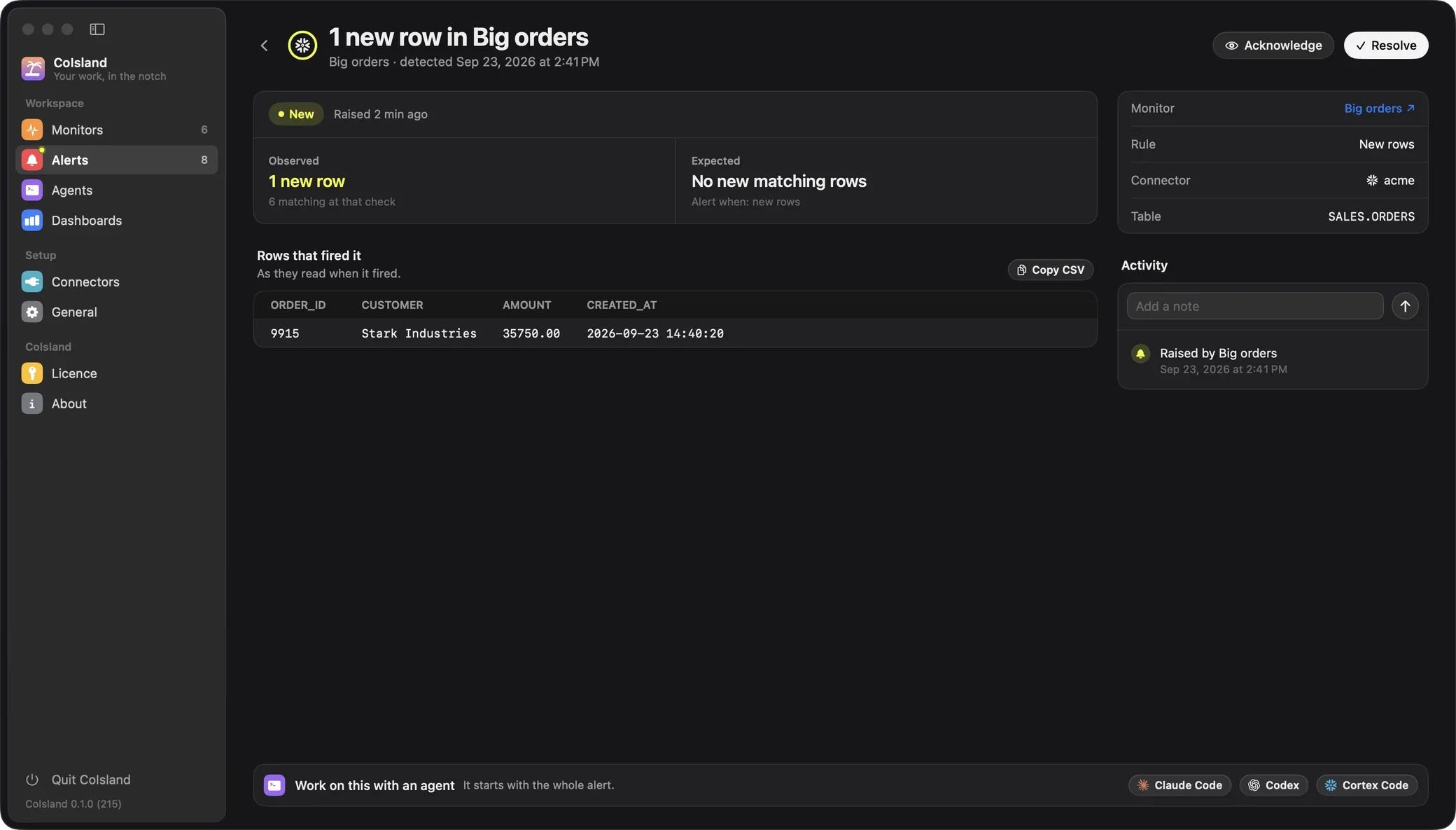
The CoIsland way in every guide ends at an alert like this one. It says what the monitor expected, what it observed and which rows fired it. You acknowledge it, add a note to its activity, resolve it, or hand it to Claude Code, Codex or Cortex Code, which opens in a terminal under the alert, fixes what is safe and asks you for the rest.

Code & deploys: GitHub guides
Failed Actions runs, pull requests waiting on your review, security alerts: hear about the ones that matter, with GitHub's own notifications first and a CoIsland monitor last.
-
Guide
GitHub Actions failure notifications on Mac
GitHub Actions failure notifications for every run, not only yours: GitHub's settings, GitHub Mobile, Slack, a workflow step, or an island on your Mac.
-
Connector
GitHub connector
Issues and pull requests · Review requests · Failed workflow runs · New releases · Security alerts
-
Setup
Connect GitHub
Connect GitHub to CoIsland with a read-only fine-grained token, the exact permissions each monitor needs, on github.com, Enterprise Server or GHE.com.
Issues & docs: Jira guides
Cut Jira email down to the issues that start matching your JQL, change status or near an SLA breach, with Jira's own notifications first.
-
Guide
Jira notifications on Mac you will actually read
Cut Jira notifications down to what matters: trim your email settings, subscribe to a JQL filter, automate a message, or get a JQL alert in your island.
-
Connector
Jira connector
Issues · Status changes · Comments · SLAs · Sprint scope
-
Setup
Connect Jira
Connect Jira Cloud or Data Center to CoIsland with an API token or a personal access token, then watch JQL, status changes, comments, SLAs and sprints.
Data: Snowflake guides
Monitor Snowflake for failed tasks, rows that break a rule and numbers that cross a line, with Snowflake's own alerts first and a read-only SQL monitor last.
-
Guide
How to get Snowflake alerts on your Mac
Set up Snowflake alerts for failed tasks and bad data with CREATE ALERT and email, task error notifications, webhooks, or a read-only monitor in your island.
-
Connector
Snowflake connector
Custom SQL · Validation
-
Setup
Connect Snowflake
Connect Snowflake to CoIsland with a programmatic access token, a read-only role and an X-Small warehouse, then run your first read-only SQL monitor.
Before you start
What you need on your Mac to follow a guide to the end.
- A Mac with Apple Silicon on macOS 14 or later, with CoIsland installed for the last step.
- An account on the tool you watch, and a token CoIsland reads with: a programmatic access token restricted to one role for Snowflake, a read-only fine-grained token for GitHub, an API token (Cloud) or a personal access token (Data Center) for Jira.
- To hand alerts to an agent: Claude Code, Codex or Cortex Code. General › AI Agents shows each CLI with its version and account, and helps you install it or sign in.
- No CoIsland account and no CoIsland server. The app talks only to your tools' own APIs, and your tokens stay on your Mac.
Every step is in the docs: start with Getting started, then your connector's setup page, linked in its group above.
Where to go next
-
Getting started
Install CoIsland, add your first connector and monitor, and read your first alert.
-
Connectors
Every connector and the monitors it brings. More are on the way, and you can ask for one.
-
Alternatives
How CoIsland compares with the notifications your tools already send. You can keep both.
-
Use cases
What data and engineering teams watch across several tools, and what an agent does next.
Questions about the guides
How do I get alerts on my Mac when something breaks at work?
Start with your tool's own notifications: a Snowflake alert can email you, GitHub can email you when a workflow run you triggered fails, and Jira emails the people watching an issue. For one place across tools, a CoIsland monitor checks each tool from your Mac on the schedule you pick and brings what changed to the island as an alert.
Do I need CoIsland to follow these guides?
No. Every guide starts with what your tool already does, and many teams stop there. CoIsland is the last way in each guide, for when you want every tool's alerts in one place on your Mac.
Can I monitor several tools from the same Mac?
Yes. Add a connector for each tool, then monitors on each one, each with its own schedule. Their alerts land in the same list and reach the same island.
Does CoIsland send my data to its own server?
No. CoIsland has no server and no account. It talks only to your tools' own APIs, from your Mac, and your tokens stay on it.
Can an AI agent fix what an alert finds?
It can help. On any alert, pick Claude Code, Codex or Cortex Code: CoIsland opens that agent in a terminal under the alert, with the whole alert as its first message, and it asks you before anything destructive.
What macOS version does CoIsland need?
A Mac with Apple Silicon on macOS 14 (Sonoma) or later. The rest of each guide needs only your tool's account and a token for it.
Will there be guides for other tools?
Yes, as connectors are added: each new connector is planned with a guide for its most common problem. Missing a tool? Ask for its connector on the Connectors page.
Work with AI. Stay in control.
CoIsland Community is free, for good. Lifetime from $29, paid once. Native for Apple Silicon, macOS 14 and later.