

Monitor Snowflake from an island on your Mac
Monitor Snowflake with read-only SQL. A failed task, a row that breaks a rule or a sudden spike reaches an island on your Mac, and Cortex Code, Claude Code or Codex can take it from there.
What CoIsland watches in Snowflake
Each monitor kind brings its own query and its own card in the island.
-
Custom SQL
Any SELECT, WITH or SHOW query. Alert on new rows, or when the row count crosses a number.
-
Validation
A table, a column and a rule such as is null. CoIsland writes the SQL and shows it.
How to monitor Snowflake: Custom SQL or Validation
A Snowflake monitor is a query CoIsland runs on a schedule through your account’s SQL API. Start from a blank monitor or from an example: impossible ages, missing emails, failed tasks, large orders, unknown browsers.
Custom SQL: a Snowflake SQL alert on any query
Write any SELECT, WITH or SHOW statement: every row it returns is watched. The editor lists the tables it reads, and Test runs it once without saving or alerting. Under Advanced, name the columns that identify a row (like ORDER_ID), how a row reads in the island ({ORDER_ID} {CUSTOMER}), and another warehouse, database or schema.

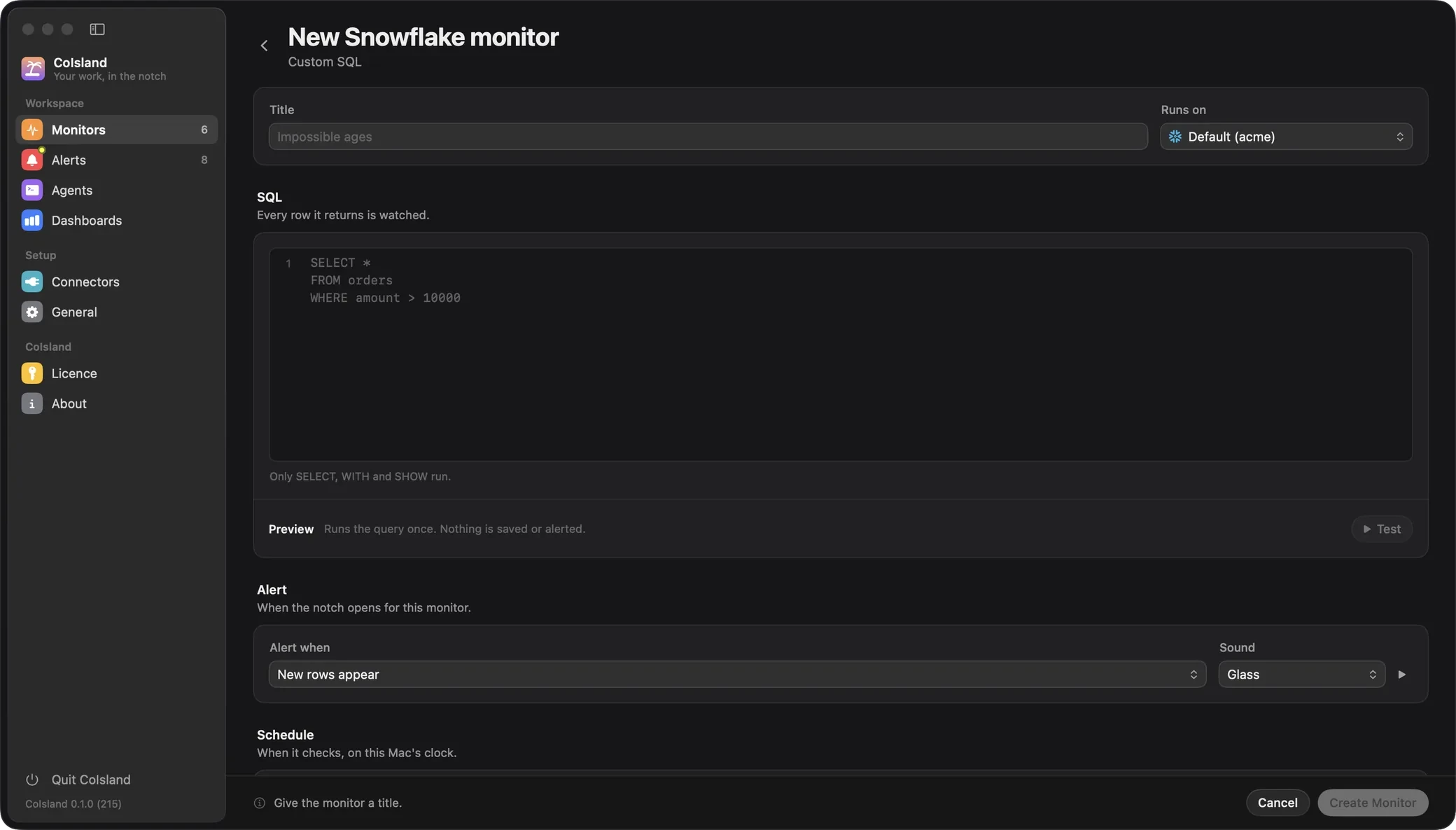
Validation: data quality checks without writing SQL
A Validation monitor finds the rows of one table that break one rule: a table, a column and a condition (is null, is null or empty, greater than, less than, equal to, not equal to, not in set). CoIsland writes the SQL and shows it: orders, order_amount and “is greater than 1000” becomes SELECT * FROM orders WHERE order_amount > 1000. Anything but a plain number is quoted as text, so nothing you type turns into SQL.

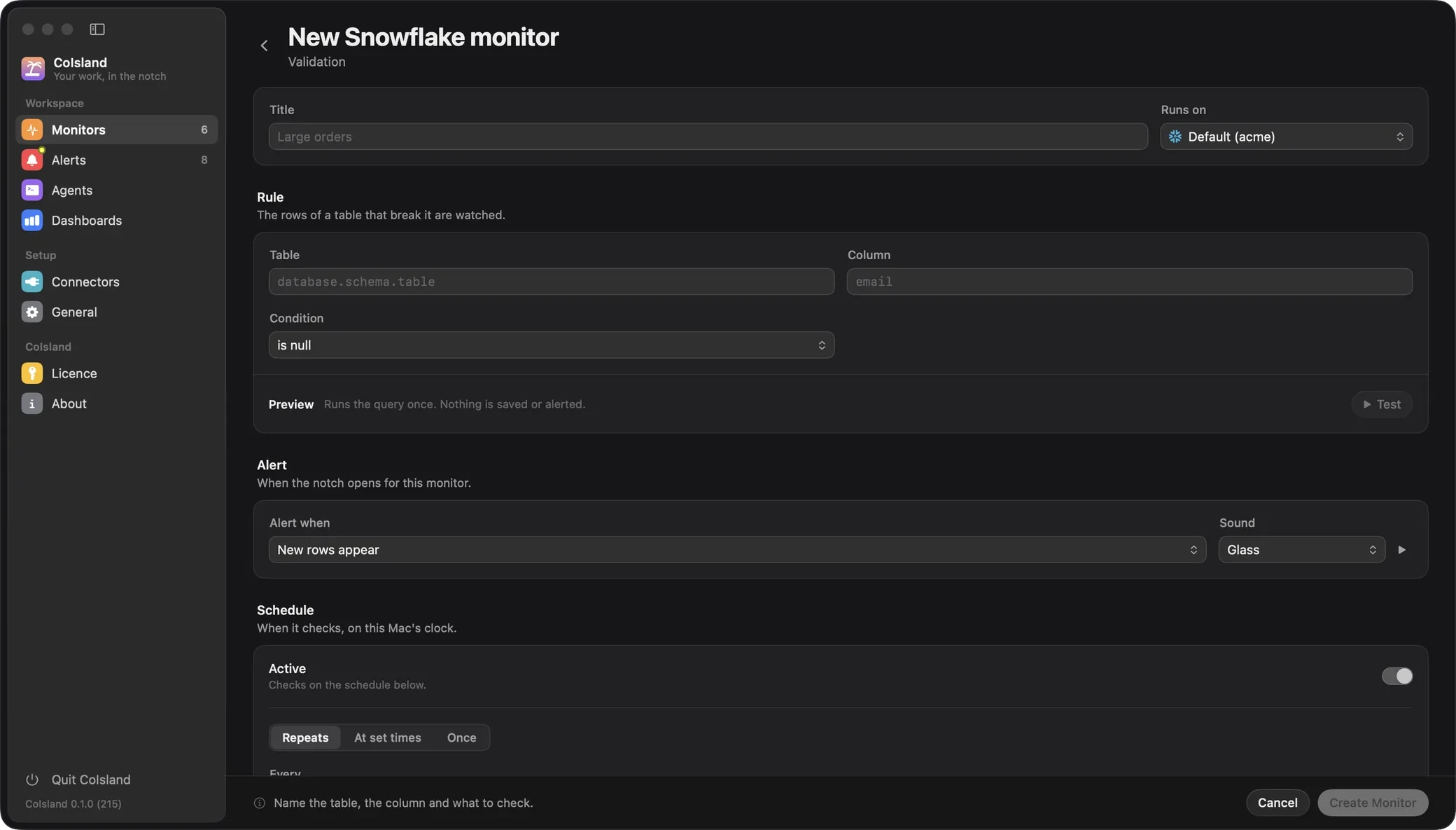
When a monitor alerts
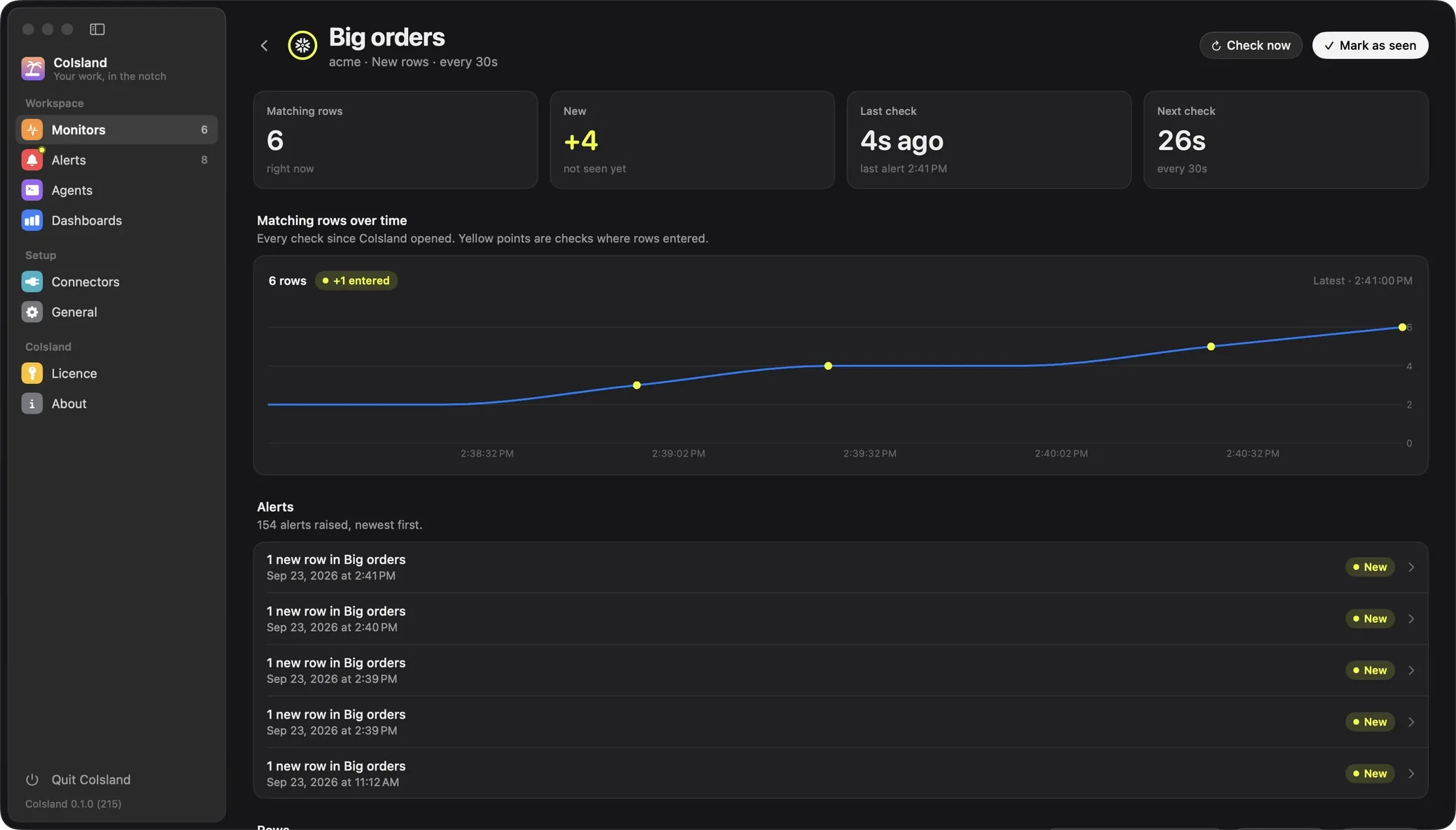
- New rows appear. The first check only records what already matches. After that, a row alerts when its identity was not in the previous check. Without an identity, a row whose values change counts as new.
- The count crosses a threshold, such as
count > 50. It fires once when that becomes true, again only after it clears, and even on the first check: a table that is already broken says so.
A check compares up to 10,000 rows; past that it compares nothing and asks you to narrow the query. Checks run every 15 minutes by default, from 30 seconds to 30 days.
Three Snowflake alerts worth setting up
Each example is a complete watch file: -- key: value lines for the settings, then the SQL. Save one in ~/.coisland/watches and it appears in Monitors a second later.
A Snowflake task failure alert
TASK_HISTORY covers the last seven days. This monitor keeps the failed runs of the last hour and alerts once per run, error included:
-- name: Failed tasks
-- connector: acme
-- database: ANALYTICS
-- every: 5m
-- alert: new-rows
-- key: QUERY_ID
-- title: {NAME} failed: {ERROR_MESSAGE}
SELECT query_id, name, state, error_message, scheduled_time
FROM TABLE(INFORMATION_SCHEMA.TASK_HISTORY(
    SCHEDULED_TIME_RANGE_START => DATEADD('hour', -1, CURRENT_TIMESTAMP()),
    ERROR_ONLY => TRUE))
WHERE state IN ('FAILED', 'FAILED_AND_AUTO_SUSPENDED')
It reads the current database, hence the database line, and only the tasks your role owns or may monitor. The step-by-step guide starts from scratch.
Rows that break a data quality rule
Duplicates need more than one column, so this rule is Custom SQL. The key line makes a third copy of the same order the same problem, not a new one.
-- name: Duplicate orders
-- connector: acme
-- every: 1h
-- key: ORDER_ID
SELECT order_id, COUNT(*) AS copies
FROM sales.public.orders
GROUP BY order_id
HAVING COUNT(*) > 1
A spike: more than N rows
This count rule speaks up when more than 20 queries failed in 15 minutes:
-- name: Failed query spike
-- connector: acme
-- database: ANALYTICS
-- every: 15m
-- alert: count > 20
SELECT query_id, user_name, warehouse_name, error_message
FROM TABLE(INFORMATION_SCHEMA.QUERY_HISTORY(
    END_TIME_RANGE_START => DATEADD('minute', -15, CURRENT_TIMESTAMP()),
    RESULT_LIMIT => 10000))
WHERE error_code IS NOT NULL
Without RESULT_LIMIT, QUERY_HISTORY stops at 100 rows. The form in Settings writes these same files, so you can review monitors in a pull request and keep them in git. Watch files lists every setting.
What a Snowflake alert on your Mac shows
When a monitor fires, the island unfolds for five seconds with its new rows and plays its sound. The alert then waits in Alerts: what the monitor expected, what it observed and when, the rows that fired it as they read then (up to 200), and Copy CSV. Acknowledge it, resolve it, or add notes to its activity.
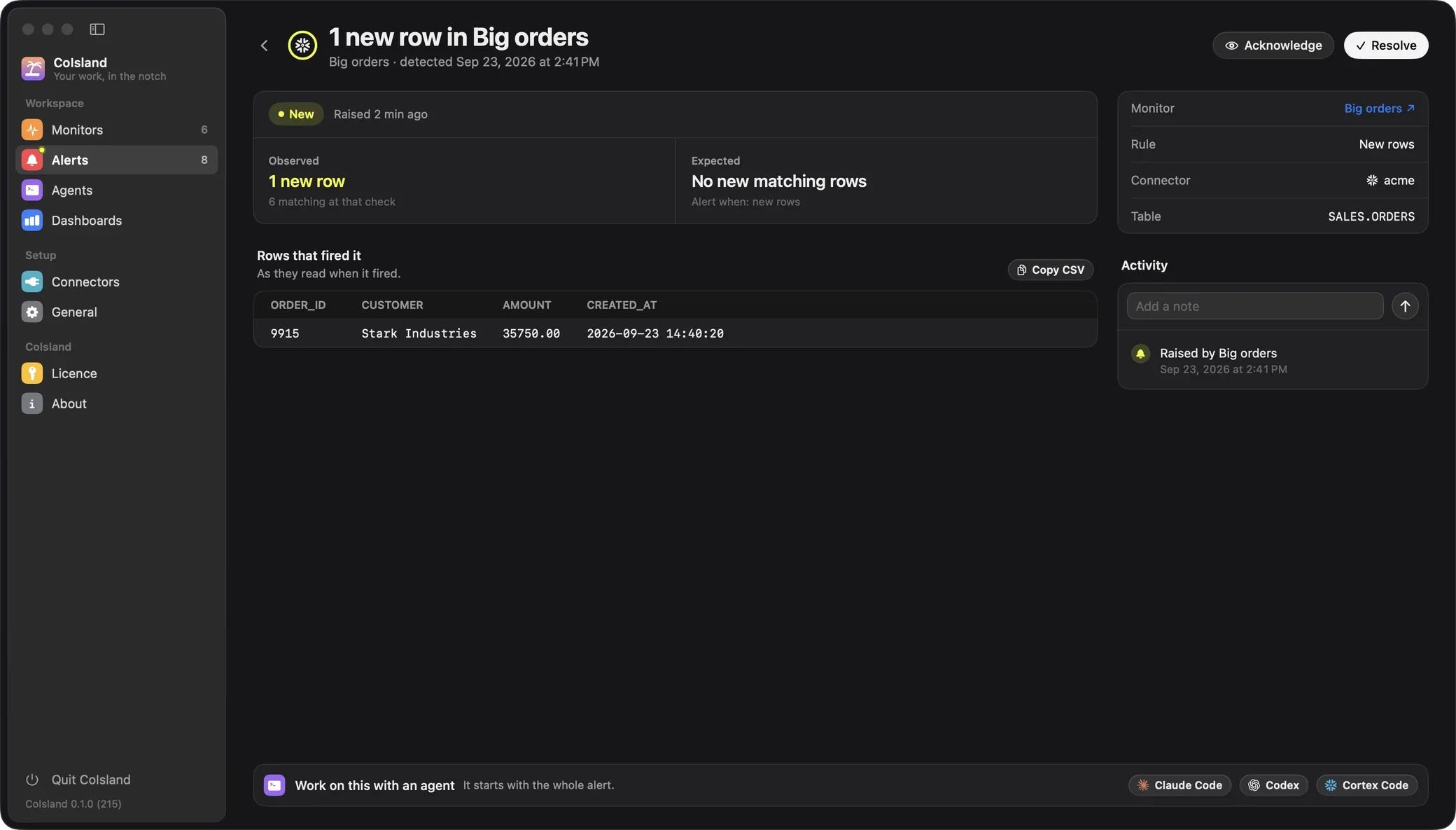
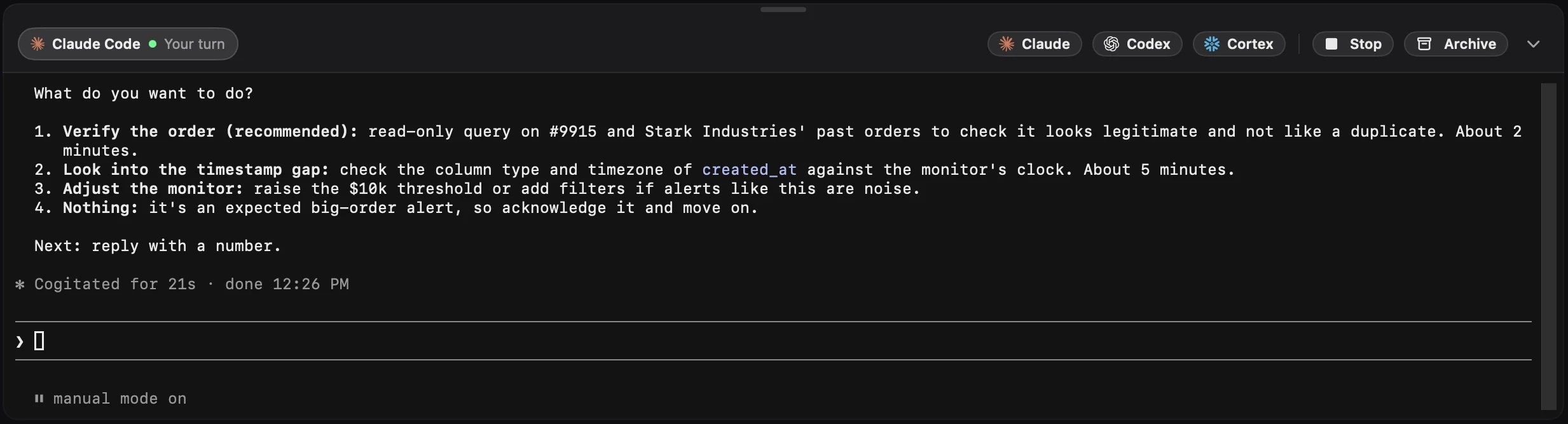
Hand it to Cortex Code, Claude Code or Codex
One click at the foot of an alert starts an agent in a terminal under it. Its first message is the whole alert: facts, the monitor’s SQL, every kept row as CSV, and the activity. The agent is asked to find the cause, fix what is safe and can be undone, and ask you before anything destructive. Claude Code and Codex start in their auto modes, Cortex Code in its default Confirm mode. Resolving the alert stays yours. Cortex Code is Snowflake’s own agent and reads the same ~/.snowflake connections. More on agents.
Read-only, signed in with a token, cheap to run
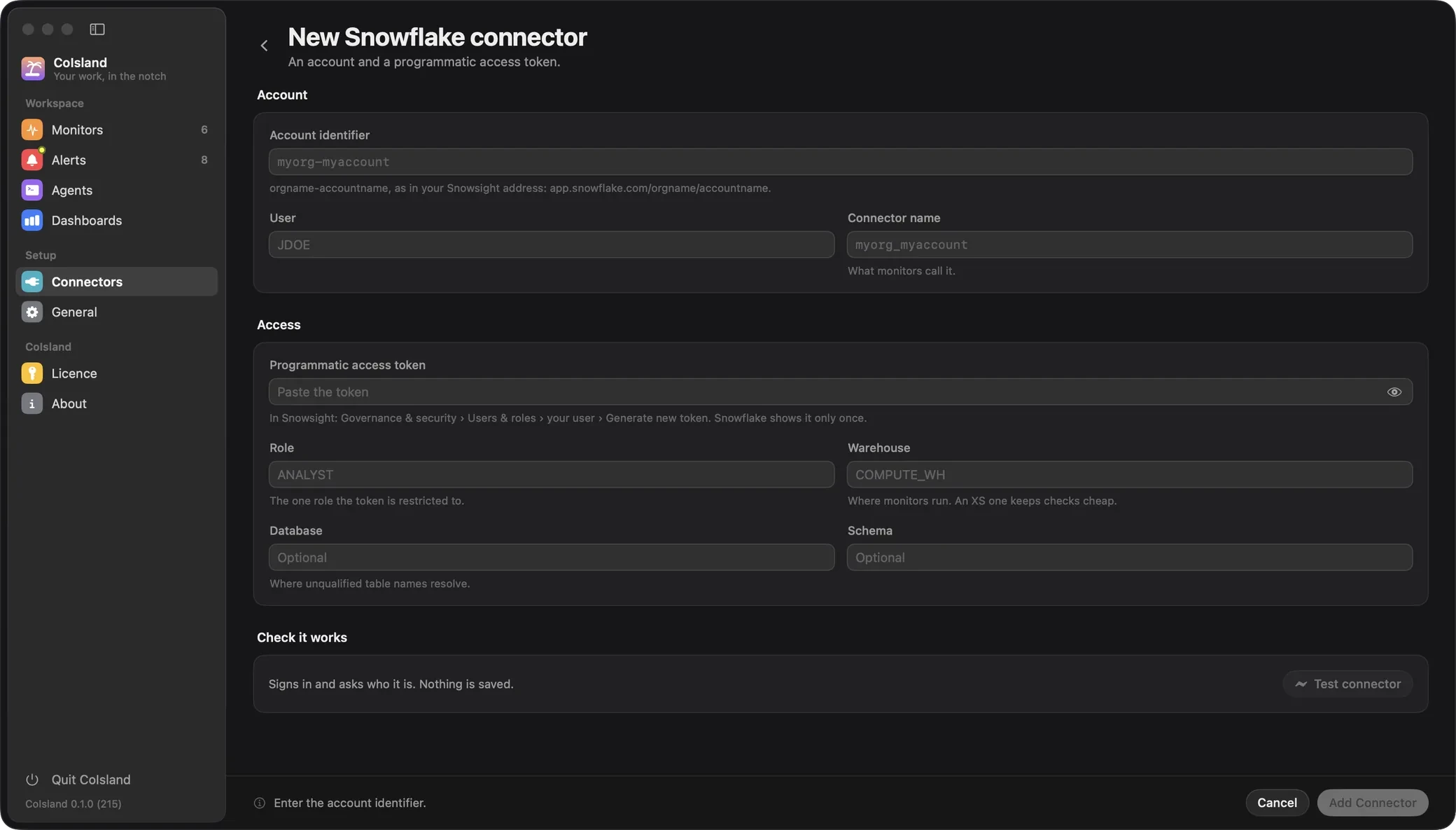
A programmatic access token that stays on your Mac
Generate the token in Snowsight under Governance & security, Users & roles, your user. Snowflake shows it once, it expires after 15 days unless you choose longer (365 at most), and by default the user must be under a network policy to use it. Restrict it to a read-only role and even a leaked token cannot change data. CoIsland keeps it in a file only you can read, next to ~/.snowflake/connections.toml, and sends it only to your account’s host. Every step: Connect Snowflake.

What checks cost
Every check runs on a warehouse, and Snowflake bills at least one minute each time a warehouse resumes. CoIsland keeps that down: 15 minutes between checks by default, checks aligned to the clock so monitors with the same interval share one resume, none while your Mac sleeps. A dedicated XS warehouse with a short auto-suspend does the rest:
CREATE WAREHOUSE IF NOT EXISTS coisland_wh
  WAREHOUSE_SIZE = XSMALL
  AUTO_SUSPEND = 60
  AUTO_RESUME = TRUE
  INITIALLY_SUSPENDED = TRUE;
Already on Snowflake’s own alerts? See how CoIsland compares, then CoIsland for data teams and every connector.
Connect it in three steps
-
In Snowsight, generate a programmatic access token for your user, restricted to a role that can read what you watch.
-
Add a Snowflake connector: account, user, token, role and warehouse, then Test connector. Or import a token connection from the Snowflake CLI.
-
Create a Custom SQL or Validation monitor, its rule and its interval: 15 minutes unless you change it.
Built for Snowflake
- Read-only by design: only SELECT, WITH or SHOW ever runs.
- Talks only to your account's SQL API: no CoIsland server or account.
- Imports your Snowflake CLI and Cortex Code connections, and never writes to ~/.snowflake.
- Each monitor is a .sql file in ~/.coisland/watches, easy to keep in git.
- Checks line up on the clock: monitors on one interval share a warehouse resume.
Then hand it to an agent
A click on the alert opens the agent in a terminal under it, with the whole alert as its first message.
-
Claude Code
Anthropic's coding agent, in its own CLI.
-
Codex
OpenAI's coding agent, in its own CLI.
-
Cortex Code
Snowflake's coding agent, in its own CLI.
Snowflake questions
How do I get an alert when a Snowflake task fails?
Create a Custom SQL monitor on INFORMATION_SCHEMA.TASK_HISTORY that keeps the runs whose state is FAILED, and alert on new rows. Each failed run then reaches the island once, with its error message. The role needs OWNERSHIP, MONITOR or OPERATE on the tasks, or MONITOR EXECUTION on the account.
Can CoIsland change or delete data in Snowflake?
No. A Snowflake monitor must start with SELECT, WITH or SHOW, and CoIsland refuses any other statement before it reaches Snowflake. Restrict the token to a role that can only read, and the token itself cannot write either.
Which Snowflake authentication does CoIsland support?
A programmatic access token, sent to the SQL API. A connection set to another authenticator (browser SSO, key pair, password) is refused with a message that says why. By default, Snowflake only accepts a token from a user who is subject to a network policy.
Does monitoring Snowflake use warehouse credits?
Yes. Each check runs its query on a warehouse, and Snowflake bills at least one minute each time a warehouse resumes. Keep the 15-minute default, use an XS warehouse with a short AUTO_SUSPEND, and give monitors the same interval so they share one resume.
Where does CoIsland keep my Snowflake token?
On your Mac, in your login Keychain, like every connector's token; the connector's other settings are in CoIsland's own connectors.json. The token only travels to your account's host: CoIsland never follows a redirect with it.
Can I reuse my Snowflake CLI or Cortex Code connection?
Yes, if it signs in with a programmatic access token (authenticator PROGRAMMATIC_ACCESS_TOKEN, with token, token_file_path or password). The first time CoIsland starts, it imports those connections under the same names, token included; later, Import from Snowflake CLI in the Snowflake form fills it from one. CoIsland reads ~/.snowflake the way the Snowflake CLI does and never writes to it.
How is CoIsland different from Snowflake alerts?
Snowflake alerts (CREATE ALERT) run inside your account and send an email or a webhook. CoIsland checks from your Mac: the rows that fired land in the island and go straight to an agent if you want. You can keep both.
Other connectors
-
Gmail
Hear about the emails that matter, not every email. Unread mail, chosen senders, labels, Drive comments and invitations reach an island on your Mac, and nothing is marked read.
-
Calendar
The calendars Calendar.app already shows (iCloud, Google, Exchange, subscriptions), or a calendar's secret ICS feed, in an island on your Mac. A countdown to your next meeting, a warning before it starts with one click to join, and news of invitations and changes.
-
Dock badges
One watch over every app that badges its Dock icon. Slack, Microsoft Teams, Outlook, Mail, Messages, Discord, WhatsApp or any other app tells the island when its count goes up, with no account or token for any of them.
-
Apple Mail
Every account Mail already has, iCloud, Exchange, Gmail or any IMAP, in an island on your Mac. New unread mail in your inboxes, or only from the people and domains you pick, with no password given to CoIsland.
-
GitHub
Monitor GitHub for what needs you, not everything that moves. Reviews, failed Actions runs, releases and security alerts, on github.com or GitHub Enterprise.
-
Vercel
Watch Vercel deployments, stuck builds and project domains. A failed build reaches an island on your Mac with its error, and the alert shows the failing step and the end of the build log.
-
GitLab
Watch GitLab on gitlab.com or a self-managed instance. A review request, a failed pipeline or a new to-do reaches an island on your Mac, and the alert shows the merge request with its description and comments, or the jobs that failed.
-
Cloudflare
Watch Cloudflare Pages deployments, Worker errors and your zones. A failed build reaches an island on your Mac with its failing step, and the alert shows the end of the build log.
-
Render
Watch the deploys of your Render services and whether they are suspended. A failed deploy reaches an island on your Mac with its commit, and a suspended service says who suspended it.
-
Docker
Know when a container on your Mac crashes, runs out of memory or can't start. The alert carries its last 30 log lines, and an agent you hand it to gets them too.
-
Local dev
See when two programs listen on the same port, a local server stops answering, or a process takes more memory or CPU than it should. Everything is read on this Mac, and nothing is sent anywhere.
-
Jira
Monitor Jira with the JQL you already write. New matches, status changes, comments, SLAs near a breach and sprint scope reach an island on your Mac, from Jira Cloud or Data Center.
-
Linear
Monitor Linear with its own issue filters. New matches, status changes, issues in triage, SLAs at risk, your mentions and projects going off track reach an island on your Mac.
-
Confluence
Monitor Confluence Cloud without the email digest. Mentions, page edits, new comments, your tasks and any CQL reach an island on your Mac, signed in with the same API token as Jira.
-
Asana
Know what landed on your plate and what is late. Tasks assigned to you, due dates, new tasks in a project and comments on your tasks reach an island on your Mac, read with your own Asana token.
-
ClickUp
Know what is yours and what is late. Tasks assigned to you, their status and due dates, and new tasks in a list reach an island on your Mac, read with your own ClickUp token.
-
Todoist
Know what is due before it is late. Tasks due today or overdue, new tasks in a project, or any filter you already use reach an island on your Mac, read with your own Todoist token.
-
Notion
Know when a Notion row lands on you, a page you care about changes, or someone comments. Read with your own personal access token, straight from your Mac.
-
Shortcut
Know when a story lands on you, moves to review, or an iteration is about to end with work still open. Read with your own Shortcut API token.
-
Airtable
Know when a record starts matching a formula, or someone edits one, without keeping the base open. Read with a personal access token scoped to the bases you pick.
-
Reminders
The reminders Reminders.app already has, iCloud or Exchange, in an island on your Mac. A warning before one is due, another when it is overdue, and news when someone adds to a list you share.
-
Sentry
Monitor Sentry with the searches you already write. New errors, regressions, issues assigned to you, failing crons, sites down and new releases reach an island on your Mac, from sentry.io or your own Sentry.
-
PagerDuty
Know at a glance whether you have to move. Incidents assigned to you, your teams' incidents and your on-call shifts reach an island on your Mac, read with your own PagerDuty token.
-
Datadog
Know when a Datadog monitor fires without living in the dashboard. Monitors in alert, incidents and metric thresholds reach an island on your Mac, read with your own application key.
-
New Relic
Run the NRQL you already trust, and see New Relic's alert issues the moment they open, in an island on your Mac, with your own User key.
-
Langfuse
Your LLM app fails, overspends or gets a thumbs down, and the island says so. Langfuse's errors, cost, latency and scores reach your Mac, read with a project's key pair on Langfuse Cloud or your own Langfuse.
-
Databricks
Monitor Databricks from an island on your Mac. A failed job run, a failed pipeline update or a triggered SQL alert reaches you for free, and read-only SQL on a warehouse watches the data itself.
-
dbt
Monitor dbt from an island on your Mac. A job run that fails, a run that takes too long or a source that goes stale reaches you, with the failing step's log one click away.
-
PostHog
Monitor PostHog from an island on your Mac. A HogQL query that finds something, an insight crossing a number or an exception seen for the first time reaches you without opening a dashboard.
-
Supabase
Monitor Supabase from an island on your Mac. A paused or unhealthy project, a new security lint or a row your SQL finds reaches you, with nothing but a personal access token.
-
PostgreSQL
Monitor PostgreSQL from an island on your Mac. A read-only query checks your database on a schedule, and each new row it finds reaches you once.
-
MySQL
Monitor MySQL and MariaDB from an island on your Mac. A read-only query checks your database on a schedule, and each new row it finds reaches you once.
-
ClickHouse
Monitor ClickHouse from an island on your Mac. A read-only query, or a health check on the system tables, runs on a schedule, and each new problem reaches you once.
-
HTTP / JSON
Point CoIsland at any address. A JSON value that changes or crosses a threshold, a new element of a JSON list, or a page that goes down or starts saying "In stock" reaches an island on your Mac.
-
RSS / Atom
Watch any feed. A new GitHub release, a new post on a blog, or a Hacker News story that says your keyword reaches an island on your Mac, with the article one click away.
-
Status pages
Know when a service you depend on is down before your users tell you. Incidents, their updates, components going down and the page's overall status reach an island on your Mac.
-
Shell command
Run a command or a script on your Mac on a schedule. A new line it prints, a new object in its JSON, or a failure reaches the island once.
-
Stripe
Watch failed payments, disputes, subscriptions, payouts and your balance with a read-only restricted key. A declined card reaches an island on your Mac with the amount, the customer and the bank's reason.
Work with AI. Stay in control.
CoIsland Community is free, for good. Lifetime from $29, paid once. Native for Apple Silicon, macOS 14 and later.