

CoIsland compared: native alerts and notch apps
Native alerts tell the whole team about everything, and other notch apps hold your music, your files or your AI sessions. CoIsland is for the part that is yours: a personal, read-only view of your whole work stack at the edge of your screen, ready for an AI agent. You can keep any of them.
What Snowflake alerts, GitHub and Jira notifications do well
They run where the work lives, reach everyone who needs them and keep going when the team logs off. Keep them.
-
Snowflake alerts
A SQL condition run inside your account, on a schedule or on new data, then an email or a notification.
-
GitHub notifications
Every thread you watch or take part in, on the web, by email and in GitHub Mobile.
-
Jira notifications
An admin's notification scheme decides who gets an email about which event, and your own settings filter it.
What CoIsland adds, from your Mac
Not another inbox: a few questions of your own, asked of every tool, answered in the island.
-
Your questions, your schedule
One question per monitor, every 30 seconds to every 30 days. It alerts on new rows or items, or once when a count goes over N.
-
Your whole stack, one island
Your warehouse, code, tickets, docs, incidents, mail and calendar report to one place, with more connectors to come.
-
Read-only by design
SQL must start with SELECT, WITH or SHOW, GitHub takes a read-only token, and nothing is written back.
-
Ready for an agent
Claude Code, Codex or Cortex Code gets the whole alert as its first message.
When a monitor fires, the island opens for a few seconds with a sound and lists what is new. A click opens the alert with its facts, the row that fired it and its activity; the alerts page follows one from new to resolved.

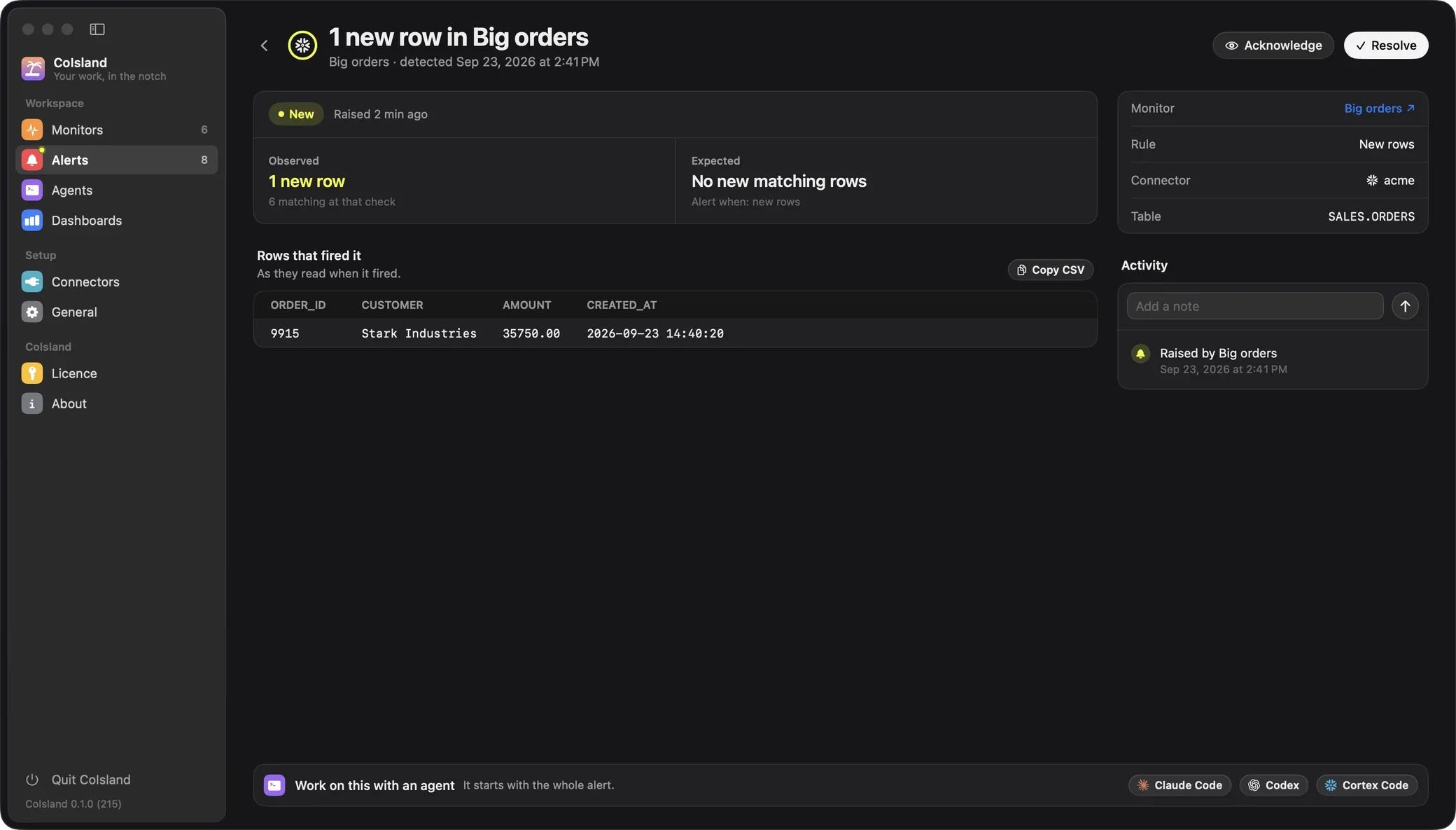
Native alerts versus CoIsland
The same question, answered two ways.
| Axis | Native alerts and notifications | CoIsland |
|---|---|---|
| Where it runs | Inside each tool, on its servers | On your Mac, calling each tool's own API; no CoIsland server or account |
| Who sets it up | Snowflake: a role with alert privileges. GitHub: you. Jira: an admin's notification scheme | You, with your own tokens; CoIsland only reads |
| What starts it | An event, or a SQL condition in Snowflake | Your question, in each tool's own language: SQL, a search, JQL or CQL |
| What arrives | An email, an inbox item or a message elsewhere | The island opens with a sound and lists what is new |
| Context attached | The message itself, often with a link back | The matching rows or items, the query, the activity |
| Across tools | One tool each | Every connector, one island |
| AI hand-off | Whatever each tool offers, inside it | An agent opens under the alert with all of it; you keep the final say |
| While your Mac sleeps | Keeps running | Pauses while the Mac sleeps, its screens are off or it is locked; a missed check runs once on wake |
That last row is the real trade-off: native alerts watch while you are away, CoIsland while you work. A new monitor's first check is a silent baseline, so old rows never flood the island.
Alternatives, tool by tool
What the native tool does well, where it stops, and how CoIsland differs.
-
Comparison
CoIsland vs GitHub notifications
Too many GitHub notifications? This GitHub notifications alternative puts only the reviews, failed runs, releases and security alerts you pick in your island.
-
Comparison
CoIsland vs Snowflake alerts
A fair Snowflake alerts alternative: what CREATE ALERT does well, where it stops, and when a read-only monitor in an island on your Mac fits better. Keep both.
-
Guide
Jira notifications on Mac you will actually read
Cut Jira notifications down to what matters: trim your email settings, subscribe to a JQL filter, automate a message, or get a JQL alert in your island.
No Jira comparison yet: until there is one, the Jira notifications guide covers it. More in the guides.
You can keep both
CoIsland changes no setting in the tools it watches, so nothing has to go. A split that works:
- Keep native alerts for what the whole team must hear, around the clock: account-wide Snowflake alerts, the GitHub inbox as the record, Jira's scheme for watchers.
- Put in the island what you act on yourself: failed tasks in your schema, reviews waiting on you, an SLA about to breach.
- Hand one to an agent when it needs work: it fixes what is safe, asks you before anything destructive, and leaves resolving to you.
Other apps at the edge of your screen
Notch apps that do another job, and the one CoIsland's island comes from.
-
Comparison
CoIsland vs Alcove
Alcove brings an iPhone-style island to the Mac: live activities, HUDs and notifications. CoIsland watches your work stack and hands its alerts to an agent.
-
Comparison
CoIsland vs boring.notch
boring.notch is a free, open-source notch for music, calendar and a file shelf. CoIsland watches your work stack and hands its alerts to an AI agent.
-
Comparison
CoIsland vs Codenotch
CoIsland's island is Codenotch's open-source notch, forked under the MIT license. Codenotch tracks your AI usage limits; CoIsland watches your work stack.
-
Comparison
CoIsland vs Droppy
Droppy turns the notch into a shelf for files, media and 38 extensions. CoIsland watches your work stack and hands its alerts to an agent. How to run both.
-
Comparison
CoIsland vs Vibe Island
Vibe Island follows the AI agents you run. CoIsland watches your work stack and hands its alerts to an agent. A fair look at both, and how to run them together.
CoIsland's island is built on Codenotch, the open-source notch by Vinz, used under the MIT license. CoIsland starts on the right edge of the screen, so it runs beside any app that lives at the notch.
Questions about CoIsland and its alternatives
Is CoIsland an alternative to Snowflake alerts?
For the alerts you act on yourself, yes. A CoIsland monitor runs a read-only query (it must start with SELECT, WITH or SHOW) from your Mac on your schedule, and alerts when new rows appear or a count goes over a number you pick. Snowflake's own alerts keep running in your account for what must be watched around the clock.
How do I get fewer GitHub notifications without missing failed runs?
GitHub notifies you about the workflow runs you triggered. A CoIsland failed workflow runs monitor looks at the runs of the last 7 days in the repositories you pick, by branch, event, workflow or actor if you like, and alerts on new failures only. Review requests, new releases and security alerts have monitors of their own.
Can I get Jira notifications on my Mac without email?
Yes. A Jira monitor runs your JQL on Jira Cloud or Data Center and alerts in the island when an issue starts matching it. Other kinds watch status changes, comments, Jira Service Management SLAs and sprint scope. Jira's own email keeps following your admin's notification scheme.
Do I have to turn off native alerts to use CoIsland?
No. CoIsland only reads, through each tool's own API, and changes no setting in the tools it watches. Keep the native alerts your team relies on, and add monitors for what you act on yourself.
Does CoIsland check my tools while my Mac is asleep?
No. Checks pause while the Mac sleeps, its screens are off or the session is locked. When you are back, each monitor that missed a check runs once. For something that must be watched around the clock, keep a native alert.
How is CoIsland different from Vibe Island and other notch apps?
Vibe Island follows the AI agents you start yourself, Codenotch shows your AI tools' usage limits, and Droppy, Alcove and boring.notch hold your files, media and system features. CoIsland watches your work stack and hands its alerts to an agent. It starts on the right edge of the screen, so it runs beside any of them.
Does CoIsland send my data to a server?
No. There is no CoIsland server and no CoIsland account: the app calls your tools' own APIs from your Mac, and your secrets stay on it. An alert reaches an AI service only when you hand it to an agent, through that agent's own CLI.
Work with AI. Stay in control.
CoIsland Community is free, for good. Lifetime from $29, paid once. Native for Apple Silicon, macOS 14 and later.