

Snowflake already has alerts: objects in your account that check a condition in SQL and send an email, a Slack message or a queue event. People look for a Snowflake alerts alternative when those alerts land in an inbox they skim, or when they cannot create and own alert objects in the account. Here is a fair comparison, with working SQL for each. Often the answer is both.
What a Snowflake alert is
A Snowflake alert is a schema-level object with three parts: a condition, an action and a schedule. When the condition returns rows, the action runs.
- Schedule: every
n MINUTE(one minute at least) or a cron expression. With no schedule, it is an alert on new data: it runs when rows are inserted and checks only those. - Compute: a warehouse you name, or serverless compute. Both use credits; on a warehouse, even an email-only action costs at least a minute.
- Privileges:
CREATE ALERTon the schema,EXECUTE ALERTon the account (only ACCOUNTADMIN can grant it), plusUSAGEon the warehouse orEXECUTE MANAGED ALERT. - Start: a new alert stays suspended until
ALTER ALERT ... RESUME.
Here is an alert that emails you when a task fails:
-- Once, by a role with CREATE INTEGRATION (ACCOUNTADMIN by default)
CREATE NOTIFICATION INTEGRATION ops_email
  TYPE = EMAIL
  ENABLED = TRUE;

CREATE ALERT ops.monitoring.failed_tasks
  WAREHOUSE = alert_wh
  SCHEDULE = '5 MINUTE'
  IF (EXISTS (
    SELECT name, error_message
    FROM TABLE(SNOWFLAKE.INFORMATION_SCHEMA.TASK_HISTORY(
      SCHEDULED_TIME_RANGE_START => DATEADD('hour', -1, CURRENT_TIMESTAMP()),
      RESULT_LIMIT => 1000,
      ERROR_ONLY => TRUE))
    WHERE state = 'FAILED'
      AND completed_time BETWEEN SNOWFLAKE.ALERT.LAST_SUCCESSFUL_SCHEDULED_TIME()
                             AND SNOWFLAKE.ALERT.SCHEDULED_TIME()
  ))
  THEN
    CALL SYSTEM$SEND_EMAIL(
      'ops_email',
      'you@example.com',
      'A Snowflake task failed',
      'A task failed in the last 5 minutes. Check TASK_HISTORY.');

ALTER ALERT ops.monitoring.failed_tasks RESUME;
Snowsight’s Monitoring » Alerts also offers templates that write this SQL for common cases.
What Snowflake’s own alerts do well
- They run in the account. They keep checking at 3 a.m., while every Mac on the team sleeps.
- They belong to a role, not a person. They survive a reorg and reach whoever the action names.
- They can act. The action is SQL: it can insert a row into a history table, not only send a message.
- Many ways to send a Snowflake alert notification. Email to verified users of the account; webhooks to Slack, Microsoft Teams, PagerDuty, Jira and ServiceNow; queues on Amazon SNS, Google Cloud Pub/Sub and Azure Event Grid.
- Tasks report their own errors to SNS, Pub/Sub or Event Grid (not to email or webhooks).
- They keep a history in
ALERT_HISTORY, and can suspend themselves after repeated failures.
Snowflake CREATE ALERT limitations
None of these is a bug; they come with living in the account.
- Someone must be allowed to own it.
EXECUTE ALERTand creating a notification integration start with ACCOUNTADMIN, so a new alert is often a request to the platform team. - “New since last time” is your SQL. A scheduled alert sees the data as it is. To keep old rows from firing again, you bound the condition with
LAST_SUCCESSFUL_SCHEDULED_TIME()and a timestamp column. - The message is what you write. The rows reach the email only if the action reads them back with
RESULT_SCANand formats them. - It lands where messages pile up. Acknowledging and closing it happen in whatever tool it reached, if anywhere.
- It sees Snowflake only, not the pull request that broke the pipeline or the Jira ticket about it.
How CoIsland works as a Snowflake alerts alternative
CoIsland is a Mac app that runs your monitors and brings what they find to the island. For Snowflake, a monitor is one read-only query.
- Your own role, read-only. The connector signs in through Snowflake’s SQL API with a programmatic access token for your own user, restricted to one role. Only
SELECT,WITHandSHOWrun. - Nothing created in the account. No alert, integration or task; the token is all you add.
- It remembers the last check. The first check records the rows silently. After that, a monitor fires on rows the previous check did not have, or once when a count goes over N.
- Light on the warehouse. Every 15 minutes by default, from 30 seconds to 30 days. Monitors with the same interval check together and share one warehouse resume. Each query is tagged
coisland:plus the monitor’s name.
The failed-task alert above becomes one file in ~/.coisland/watches, with no time window to keep right:
-- name: Failed tasks
-- every: 5m
-- alert: new-rows
-- key: name, scheduled_time
-- title: {NAME} failed
SELECT name, scheduled_time, error_message
FROM TABLE(SNOWFLAKE.INFORMATION_SCHEMA.TASK_HISTORY(
  SCHEDULED_TIME_RANGE_START => DATEADD('hour', -1, CURRENT_TIMESTAMP()),
  RESULT_LIMIT => 1000,
  ERROR_ONLY => TRUE))
WHERE state = 'FAILED'
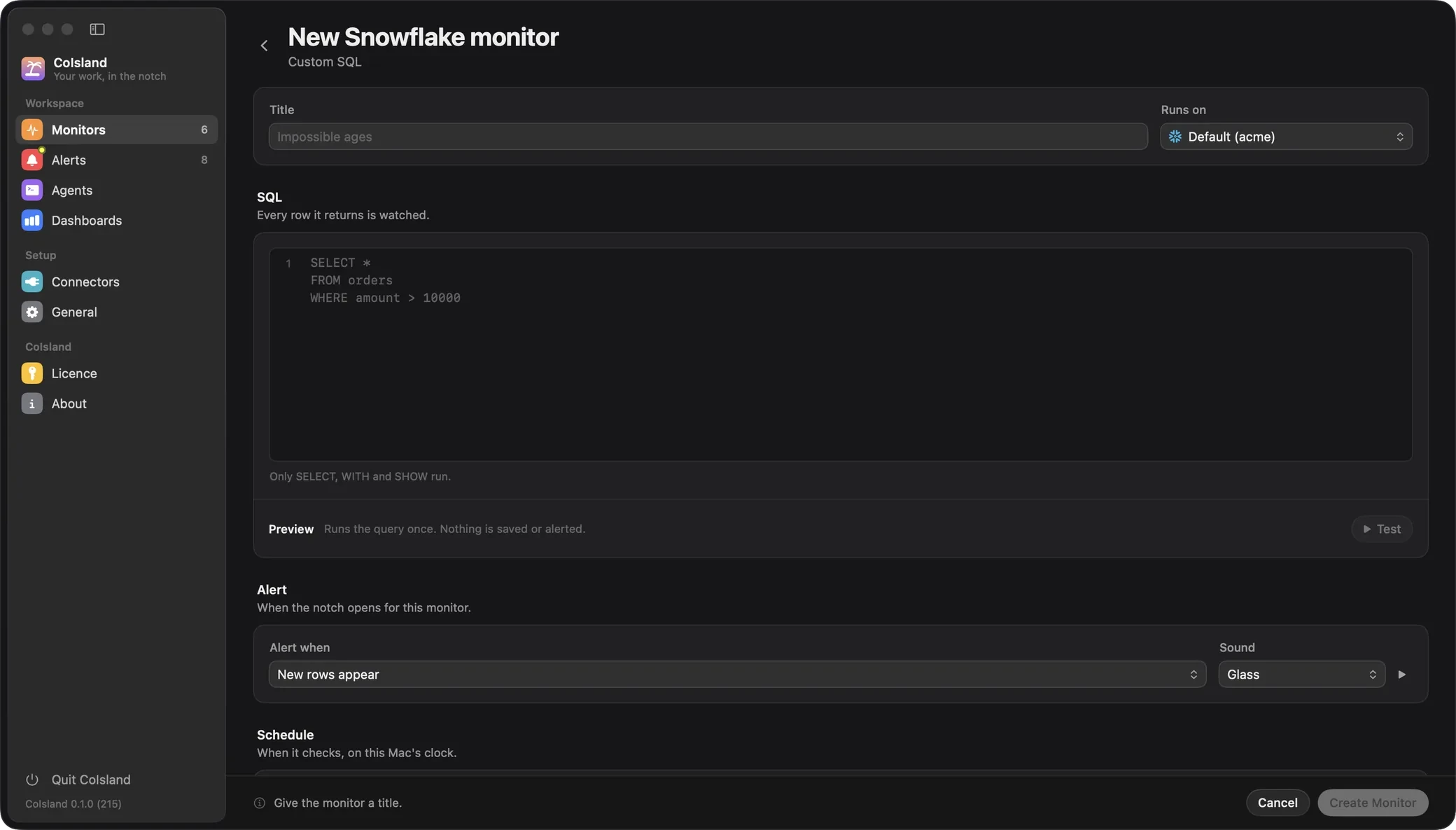
key names what makes a row the same run; title is the line the island shows. You can also write it in Settings › Monitors, where Test runs it once before you save.

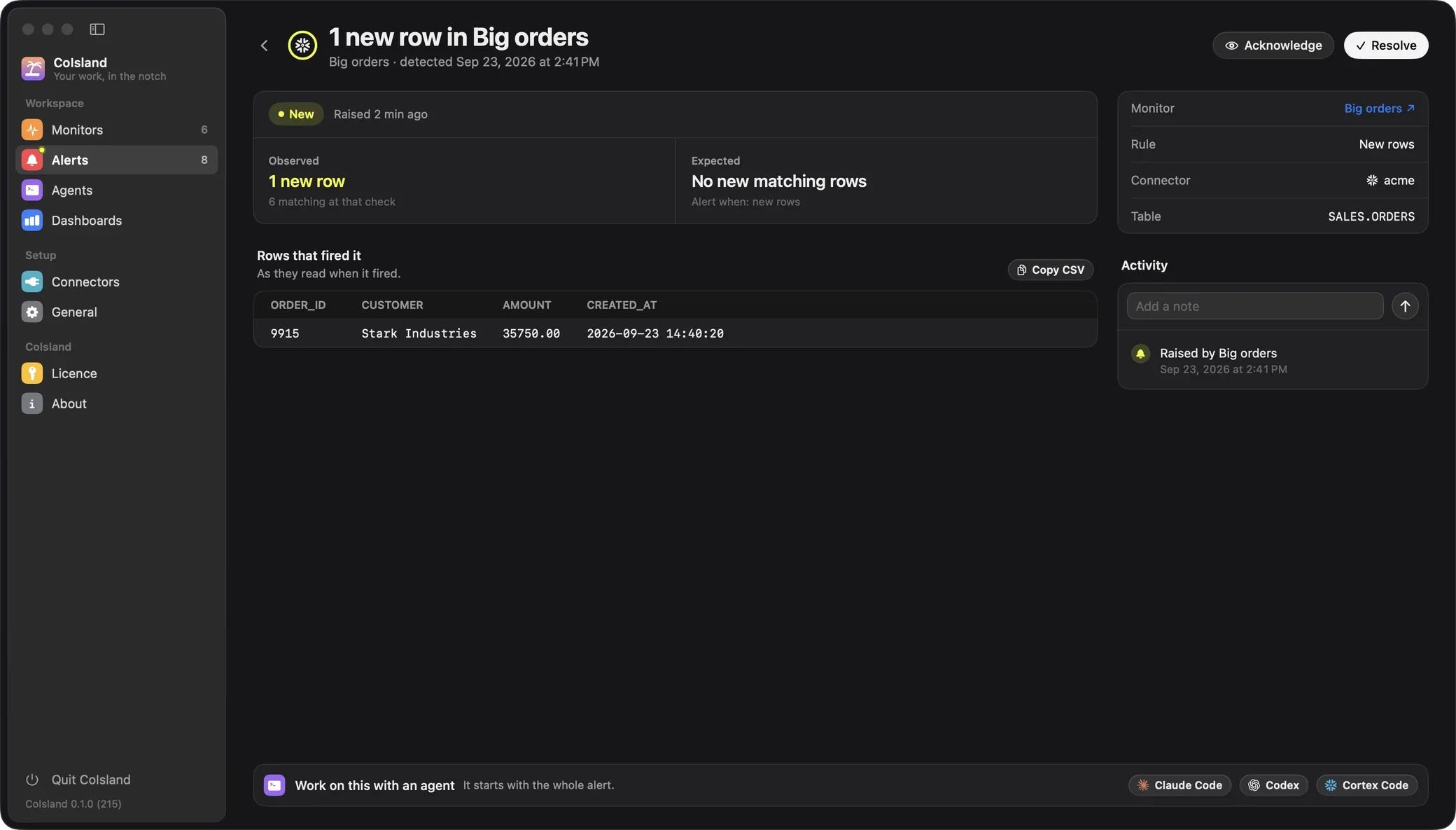
The alert carries the rows that fired it
When a monitor fires, the island opens and plays its sound. The alert keeps what was expected, what was seen and the rows as they read then, so you never rerun the query. Acknowledge it, add notes, resolve it; the 500 newest alerts are kept.
An agent that works, you keep the final say
Hand the alert to Claude Code, Codex or Cortex Code. Each runs its own CLI in a terminal under the alert, gets the whole alert as its first message (facts, query, rows, activity) fixes what is safe and asks you before anything destructive. Resolving the alert stays yours. See agents.
The rest of your stack, in the same place
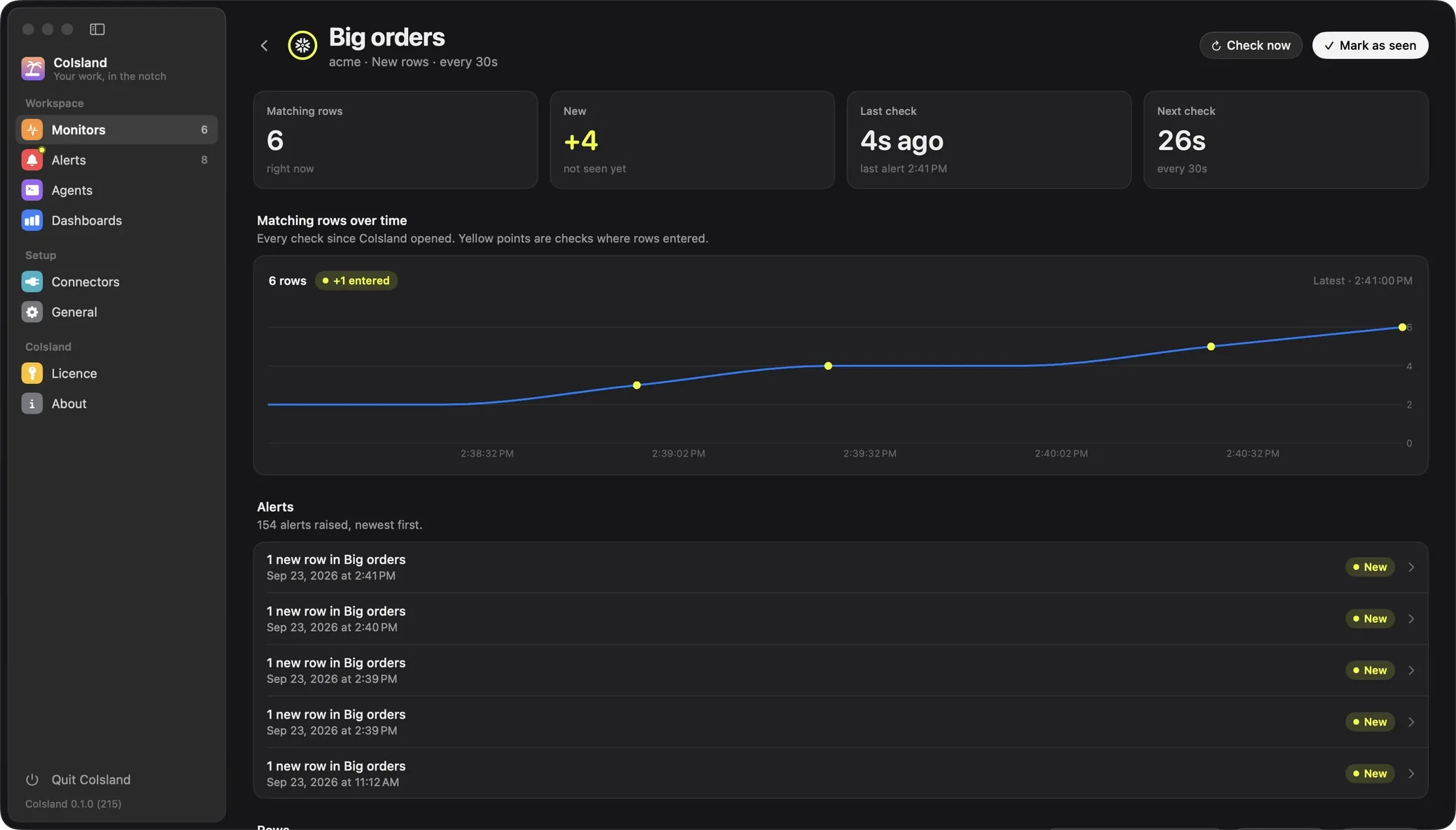
CoIsland also has connectors for GitHub (failed runs, review requests, security alerts) and Jira (JQL, status changes, SLAs), with more to come. Each monitor has its own page, and dashboards chart alerts and time to resolve over 24 hours, 7 or 30 days.
Where CoIsland is weaker
- It runs only while your Mac is awake and CoIsland is open. Checks pause while the Mac sleeps, its screens are off or it is locked; when you are back, a monitor that missed checks runs once. No server covers the night.
- It is personal. Monitors and alerts live on your Mac. Nobody else sees them, and CoIsland sends no email, chat message or page.
- The token follows your account’s rules. By default, Snowflake accepts a programmatic access token only from a user under a network policy, so an admin may need to set one up.
- It still uses credits, one query per check, and it needs an Apple Silicon Mac on macOS 14 or later.
Snowflake alerts vs CoIsland: feature comparison
| Snowflake alerts | CoIsland | |
|---|---|---|
| Runs | In your account, always | On your Mac, while it is awake and CoIsland is open |
| Schedule | One minute and up, or cron | 30 seconds to 30 days, 15 minutes by default |
| What you write | An alert, a notification integration, a resume | One SELECT, WITH or SHOW query |
| Privileges | EXECUTE ALERT, CREATE ALERT, compute | Your own role, read-only |
| New since last time | Your SQL, with a time window | Rows compared with the previous check |
| Who hears, where | Whoever the action names: email, chat, pager, ticket, queue | You, in an island on your Mac |
| The rows | In the message, if the action adds them | In the alert, as they read when it fired |
| After it fires | Up to the tool it reaches | New, acknowledged, resolved, notes |
| Other tools | Snowflake only | 10 more connectors, GitHub and Jira among them |
| Next step | Your runbook | Claude Code, Codex or Cortex Code |
| Price | Credits per run | Credits per check; CoIsland Community free for 2 monitors, Lifetime once for every monitor |
Which to pick, and how to keep both
Pick Snowflake alerts when it must fire at night, when a team must hear it, or when it pages someone or writes back to the account.
Pick CoIsland when you are the one who acts on it, when you cannot create alert objects, when you want the rows and an agent at hand, or when the problem spans Snowflake and your other tools.
Keep both. Leave the alerts your company depends on in Snowflake, owned by the platform team’s role, and put your own checks in CoIsland. If your role owns the Snowflake alerts, CoIsland can watch them too, since ALERT_HISTORY shows their runs to their owner:
-- name: Snowflake alerts
-- every: 5m
-- key: name, scheduled_time
-- title: {NAME}: {STATE}
SELECT name, state, scheduled_time, sql_error_message
FROM TABLE(SNOWFLAKE.INFORMATION_SCHEMA.ALERT_HISTORY(
  SCHEDULED_TIME_RANGE_START => DATEADD('hour', -1, CURRENT_TIMESTAMP()),
  RESULT_LIMIT => 1000))
WHERE state IN ('TRIGGERED', 'FAILED', 'CONDITION_FAILED', 'ACTION_FAILED')
The team still gets its email, and each run that fired or failed also reaches your island. To start, connect Snowflake; for more, see the Snowflake connector, the guide to Snowflake alerts on your Mac and CoIsland for data teams. Other comparisons: GitHub notifications and all alternatives.